

2.1 为什么推荐提示词模板?
在 LangChain 开发中,构造提示词既可以直接使用 Python 字符串拼接(如 f-string、format() 或+),也可以使用 LangChain 提供的 PromptTemplate 或 ChatPromptTemplate 。
举例1:字符串拼接方式
# 字符串拼接
topic = "Python"
difficulty = "初学者"
# 难以维护,容易出错
prompt_str = f"你是一个{difficulty}级别的编程导师。请用简单易懂的语言解释{topic}。"
response = model.invoke(prompt_str)
print(f"AI 回复:{response.content}...\n")- 优点✅:
- 简单直接,上手快
- 适合临时 demo
- 无额外学习成本
- 缺点❌:
- 可读性差(变量多时混乱)
- 不易维护(修改容易出错)
- 无变量校验(容易漏/拼错)
- 难以支持复杂场景(多轮对话 / RAG / Few-shot)
- 举例2:提示词模板
from langchain.prompts import PromptTemplate
topic = "Python"
difficulty = "初学者"
template = PromptTemplate.from_template(
"你是一个{difficulty}级别的编程导师。请用简单易懂的语言解释{topic}。"
)
# 使用模板生成提示词
prompt = template.format(difficulty=difficulty, topic=topic)
response = model.invoke(prompt)
print(f"AI 回复:{response.content}...\n")
from langchain_core.prompts import ChatPromptTemplate
prompt_template = ChatPromptTemplate([
("system", "你是一个AI开发工程师. 你的名字是 {name}."),
("human", "{user_input}")
])
#调用format()方法,返回字符串
prompt = prompt_template.invoke({"name":"小谷AI", "user_input":"你能帮我做什
么?"})
print(prompt)- 优点✅:
- 结构清晰(变量占位)
- 易维护、可复用
- 自动变量校验(更安全)
- 支持复杂场景(对话 / RAG / Agent)
- 可与 LangChain 生态无缝集成
- 便于调试与日志追踪
- 缺点❌:
- 有一定学习成本
- 初期写法略复杂
- 对极简单场景略“重”
- 开发建议:
- 小项目 / 临时用 → 字符串拼接
- 正式开发 / AI应用 → 提示词模板(必选)
2.2 提示词机制演进
LangChain 1.0的架构变革中,核心的演进之一体现在 Prompt 机制上:一个结构化的、富含元数据的消
息列表已经取代单一字符串,成为与模型交互的标准数据格式。
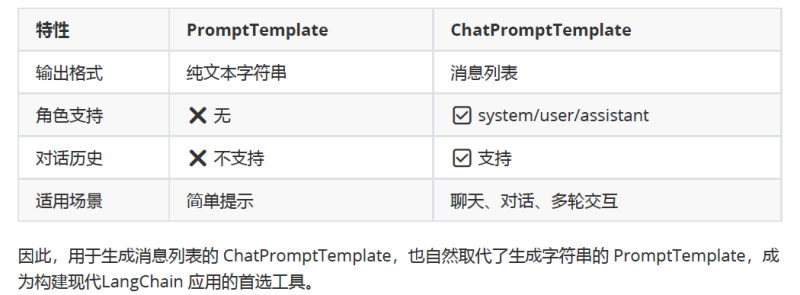
1、旧时代:LLM + PromptTemplate(输入与输出均为字符串)
① 模型接口:对应于 LangChain 中的LLM类,主要面向早期的文本补全模型。
② 工作方式:模型接受一个单一的字符串作为输人,基于此预测并生成后续的文
本内容(文本补全)。
③ Prompt 工具:核心工具是 PromptTemplate 。它的职责是接收一组变量,并通过
模板渲染,最终输出一个完整的字符串。
from langchain.prompts import PromptTemplate
prompt_template = PromptTemplate.from_template(
"请给我一个关于{topic}的{type}解释。"
)
#传入模板中的变量名
prompt = prompt_template.format(type="详细", topic="量子力学")
print(prompt)
④ 局限性:当我们需要用这种方式模拟多轮聊天时,开发者必须在字符串中手动拼接和伪造对话角色,例如:
“Human:你好\nAI:你好!有什1 么我能帮忙的吗?\nHuman:…”
这种方式不仅导致Prompt 的结构混乱、难以维护,也极易让模型混淆对话的边界与上下文,影响生成
质量。
2、新时代:ChatModel+ChatPromptTemplate(输入与输出均为消息列表)
① 模型接口:对应 LangChain 1.0 的主流接口 ChatModel。
② 工作方式:现代聊天模型 API 已原生支持角色概念。它们不再接受单一字符串,
而是要求输入一个结构化的消息列表。为构建复杂、可靠的多轮对话智能体系统奠定了坚实的基础。
③ Prompt 工具: ChatPromptTemplate 因此成为LangChain 1.0 中最核心的 Prompt工具。它的职
责是接收变量,并输出一个 List「BaseMessage](消息列表),该列表可直接传递给聊天模型。
二者对比:
2.3 ChatPromptTemplate的使用
在LangChain 1.0中,ChatPromptTemplate 是用于生成消息列表的核心组件。
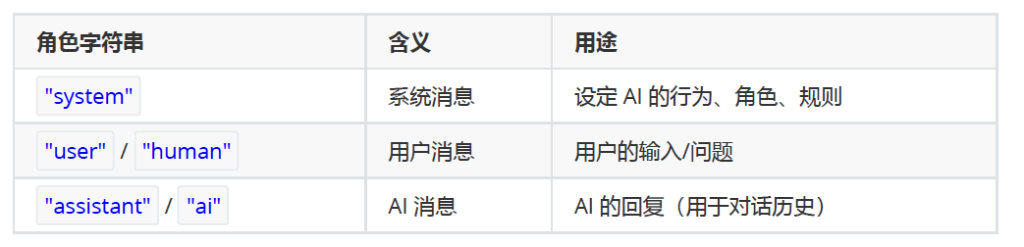
ChatPromptTemplate是创建聊天消息列表的提示模板。它比普通 PromptTemplate 更适合处理多角色、多轮次的对话场景。支持 System / Human / AI 等不同角色的消息模板。
消息类型:
2.3.1 两种实例化方式
ChatPromptTemplate 可以通过初始化方法或 from_messages 方法来实例化提示词模板。实例化时需要传入 messages参数。常见类型是:tuple构成的列表,参数类型(role : str,content : str )
方式1(推荐):调用from_messages()
该方法允许传入一个由元组(Tuple)构成的列表,列表中的每一个元组都代表一条具有特定角色的消息。
举例1:
# 导入相关依赖
from langchain_core.prompts import ChatPromptTemplate
# 定义聊天提示词模版
chat_template = ChatPromptTemplate.from_messages(
[
("system", "你是一个有帮助的AI机器人,你的名字是{name}。"),
("human", "你好,最近怎么样?"),
("ai", "我很好,谢谢!"),
("human", "{user_input}"),
]
)
# 格式化聊天提示词模版中的变量
prompt = chat_template.invoke({"name":"小明", "user_input":"你叫什么名字?"})
# 打印格式化后的聊天提示词模版内容
print(prompt)
messages=[SystemMessage(content='你是一个有帮助的AI机器人,你的名字是小明。',
additional_kwargs={}, response_metadata={}), HumanMessage(content='你好,
最近怎么样?', additional_kwargs={}, response_metadata={}),
AIMessage(content='我很好,谢谢!', additional_kwargs={},
response_metadata={}, tool_calls=[], invalid_tool_calls=[]),
HumanMessage(content='你叫什么名字?', additional_kwargs={},
response_metadata={})]方式2:使用实例初始化方法
举例:
from langchain_core.prompts import ChatPromptTemplate
#参数类型这里使用的是tuple构成的list
prompt_template = ChatPromptTemplate([
# 字符串 role + 字符串 content
("system", "你是一个AI开发工程师. 你的名字是 {name}."),
("human", "你能开发哪些AI应用?"),
("ai", "我能开发很多AI应用, 比如聊天机器人, 图像识别, 自然语言处理等."),
("human", "{user_input}")
])
#调用invoke()方法,返回ChatPromptValue
prompt = prompt_template.invoke({"name":"小谷AI", "user_input":"你能帮我做什
么?"})
print(prompt)
messages=[SystemMessage(content='你是一个AI开发工程师. 你的名字是 小谷AI.',
additional_kwargs={}, response_metadata={}), HumanMessage(content='你能开
发哪些AI应用?', additional_kwargs={}, response_metadata={}),
AIMessage(content='我能开发很多AI应用, 比如聊天机器人, 图像识别, 自然语言处理
等.', additional_kwargs={}, response_metadata={}, tool_calls=[],
invalid_tool_calls=[]), HumanMessage(content='你能帮我做什么?',
additional_kwargs={}, response_metadata={})]说明:from_messages()的底层,也是调用的类的__init()__方法











请登录后查看评论内容