

在这一部分,我们将详细介绍如何使用 Python(基于 sklearn)训练 SVM 模型,并评估其性能。
步骤包括:
- 模型训练
- 利用网格搜索(Grid Search)对超参数(如正则化参数 C 以及最大迭代次数 max_iter)进行调优。
- 选择基于 F1 分数作为评价指标的最佳模型。
- 模型评估
- 使用多项指标评估模型性能:准确率(Accuracy)、精确率(Precision)、召回率(Recall)以及 F1 分数。
- 生成详细的分类报告,并绘制混淆矩阵。
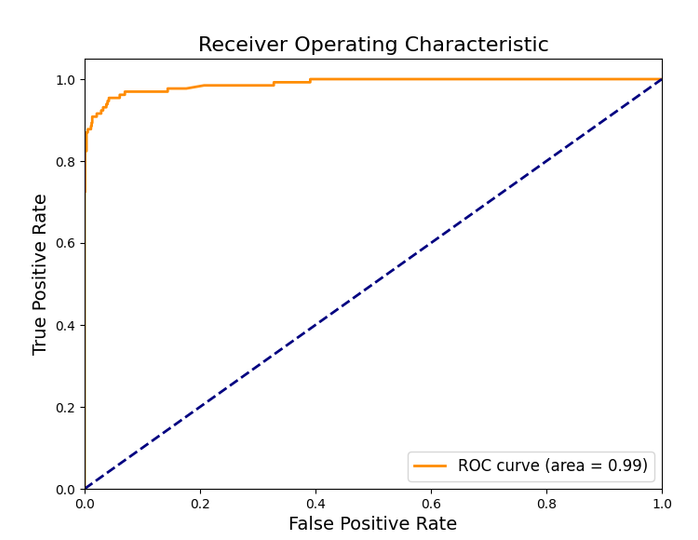
- 绘制 ROC 曲线,通过决策函数(decision_function)计算 ROC 曲线,展示模型在不同阈值下的性能。
- 可视化展示
- 非常详细标注每一部分内容。
import numpy as np
import matplotlib.pyplot as plt
import seaborn as sns

from sklearn.svm import LinearSVC
from sklearn.model_selection import GridSearchCV
from sklearn.metrics import (accuracy_score, precision_score, recall_score, f1_score,
                             classification_report, confusion_matrix, roc_curve, auc)

# 1. 模型训练与超参数调优
# 定义初始的 LinearSVC 模型
svm_model = LinearSVC(random_state=42)

# 定义超参数网格,用于调优 C 和 max_iter 参数
param_grid = {
    'C': [0.01, 0.1, 1, 10, 100],
    'max_iter': [1000, 2000, 5000]
}

# 使用 GridSearchCV 进行超参数调优,评价指标选择 F1 分数,采用 5 折交叉验证
grid_search = GridSearchCV(svm_model, param_grid, cv=5, scoring='f1', n_jobs=-1)
grid_search.fit(X_train, y_train)

# 输出最佳超参数
print("Best Parameters:", grid_search.best_params_)

# 使用最佳超参数构建模型
best_svm_model = grid_search.best_estimator_

# 2. 模型评估
# 在测试集上进行预测
y_pred = best_svm_model.predict(X_test)

# 计算主要评价指标
accuracy = accuracy_score(y_test, y_pred)
precision = precision_score(y_test, y_pred)
recall = recall_score(y_test, y_pred)
f1 = f1_score(y_test, y_pred)

print("Accuracy:", accuracy)
print("Precision:", precision)
print("Recall:", recall)
print("F1 Score:", f1)


# 输出详细的分类报告
print("\nClassification Report:\n", classification_report(y_test, y_pred))

# 3. 可视化展示
# 3.1 绘制混淆矩阵
cm = confusion_matrix(y_test, y_pred)
plt.figure(figsize=(8,6))
sns.heatmap(cm, annot=True, fmt='d', cmap='Spectral', cbar=True)
plt.title("Confusion Matrix", fontsize=16)
plt.xlabel("Predicted Label", fontsize=14)
plt.ylabel("True Label", fontsize=14)
plt.show()

# 3.2 绘制 ROC 曲线
# LinearSVC 没有 predict_proba 方法,使用 decision_function 得到连续的分数
y_scores = best_svm_model.decision_function(X_test)
fpr, tpr, thresholds = roc_curve(y_test, y_scores)
roc_auc = auc(fpr, tpr)

plt.figure(figsize=(8,6))
plt.plot(fpr, tpr, color='darkorange', lw=2, label='ROC curve (area = %0.2f)' % roc_auc)
plt.plot([0, 1], [0, 1], color='navy', lw=2, linestyle='--')
plt.xlim([0.0, 1.0])
plt.ylim([0.0, 1.05])
plt.xlabel('False Positive Rate', fontsize=14)
plt.ylabel('True Positive Rate', fontsize=14)
plt.title('Receiver Operating Characteristic', fontsize=16)
plt.legend(loc="lower right", fontsize=12)
plt.show()- 模型训练与调优:我们采用
GridSearchCV对LinearSVC模型的超参数C 和max_iter 进行调优,其中C 控制正则化强度,max_iter 控制模型训练的最大迭代次数。交叉验证使用 5 折,评价指标选择 F1 分数以平衡精确率和召回率。 - 模型评估:
- Accuracy:衡量整体分类正确的比例。
- Precision:衡量预测为垃圾短信中真实为垃圾短信的比例。
- Recall:衡量所有实际垃圾短信中被正确预测的比例。
- F1 Score:精确率和召回率的调和平均,提供综合评价。
- Classification Report:详细展示各类别的指标。
- Confusion Matrix:通过热力图展示预测与实际标签的对比情况。
- ROC 曲线:由于
LinearSVC不支持predict_proba方法,我们使用decision_function得到样本分数,进而计算 ROC 曲线,并计算曲线下面积(AUC),以展示模型在不同阈值下的分类能力。
![图片[1]-5. 模型训练与评估-大赛人网](https://www.dsrw.com/wp-content/uploads/2026/10/image-339.png)
6. 结果分析与解读
在本案例中,我们通过对短信数据进行探索、特征工程以及 SVM 模型的训练与调优,得到了一个能够有效区分垃圾短信和正常短信的分类模型。
6.1 数据分析与模型评估结果解读
- 数据分布与特征的重要性
- 类别不平衡:数据探索阶段显示,垃圾短信与正常短信的数量分布可能存在不平衡,这对模型的学习带来了挑战。
- 文本特征:通过 TF-IDF 提取的 3000 维特征能够较好地反映短信中关键单词的重要性。特别是一些高频词(如 “free”, “win”, “claim”)在垃圾短信中出现频率较高,有助于模型建立决策边界。
- 模型调优与超参数选择
- 通过 GridSearchCV 调优参数,我们找到了最适合当前数据的超参数组合(例如最佳的C 值和max_iter 参数),这说明在高维稀疏文本数据中,合理的正则化参数能够有效避免过拟合,同时保证模型在测试集上具有较好的泛化能力。
- 性能指标解读
- 准确率(Accuracy):衡量了整体分类正确的比例;
- 精确率(Precision):在预测为垃圾短信的样本中,真实垃圾短信所占的比例,体现了模型在避免误报上的能力;
- 召回率(Recall):在所有实际垃圾短信中,模型正确检测到的比例,反映了模型捕捉垃圾短信的敏感度;
- F1 分数:精确率和召回率的调和平均,是综合性能的体现。
- 从混淆矩阵可以看出,模型在区分垃圾短信和正常短信方面具有较高的识别率,并且误分类的数量较少。
- ROC 曲线和 AUC(曲线下面积)的表现进一步证明了模型在不同分类阈值下均能保持较好的判别能力。
6.2 指导性意义
- 提高用户体验与安全性
- 垃圾短信通常会给用户带来骚扰甚至引发诈骗风险。通过该模型的有效检测,可以在通信系统中及时过滤垃圾短信,提高用户体验,减少用户被诈骗的风险。
- 特征工程的推广
- 本案例中采用的 TF-IDF 特征提取方法及文本预处理流程具有较强的普适性。该方法不仅适用于垃圾短信检测,还可以推广到其他文本分类任务,如垃圾邮件过滤、情感分析等。
- 同时,结合短信长度等辅助特征,也为多维特征融合提供了借鉴,说明在文本数据中引入额外信息可以进一步提升模型性能。
- 模型调优和评估流程的借鉴
- 通过网格搜索调参、交叉验证及多维度评价指标,我们构建了一套完整的模型训练与评估流程。这种方法论对于其他类似的分类问题具有参考价值,有助于在实际场景中快速构建和部署高效的分类系统。
- 进一步优化的方向
- 数据增强:针对垃圾短信样本较少的情况,可以考虑数据增强或采样方法,进一步改善模型的鲁棒性。
- 特征扩展:尝试结合其他文本特征(如 n-grams、情感特征)以及元数据(如发送时间、频次等),可能会带来更高的识别准确率。
- 模型融合:结合其他模型(如朴素贝叶斯、随机森林等)的预测结果,通过模型融合进一步提高检测性能。
7. 完整代码
import matplotlib.pyplot as plt
import numpy as np
import pandas as pd
import seaborn as sns
from sklearn.decomposition import PCA
from sklearn.feature_extraction.text import CountVectorizer
from sklearn.feature_extraction.text import TfidfVectorizer
from sklearn.metrics import (accuracy_score, precision_score, recall_score, f1_score, classification_report,
                             confusion_matrix, roc_curve, auc)
from sklearn.model_selection import GridSearchCV
from sklearn.model_selection import train_test_split
from sklearn.preprocessing import LabelEncoder
from sklearn.svm import LinearSVC
from wordcloud import WordCloud

# 读取数据集
file_path = "./dataset/011/spam.csv"
df = pd.read_csv(file_path, encoding='ISO-8859-1')

# 查看数据前几行
df.head()

# 查看数据集的基本信息
df.info()

# 查看数据的统计摘要
df.describe(include="all")

# 只保留有用的列
df = df[['v1', 'v2']]

# 重命名列
df.columns = ['label', 'message']

# 再次检查数据
df.head()

# 检查缺失值
missing_values = df.isnull().sum()
print(missing_values)

# 由于本数据集无缺失值,若有可使用以下方法填充:
df = df.dropna()  # 删除缺失值
# df = df.fillna('未知')  # 或者填充特定值

# 检查重复值
duplicate_count = df.duplicated().sum()
print(f"重复值数量: {duplicate_count}")

# 删除重复值
df = df.drop_duplicates()

# 统计各类别的数量
plt.figure(figsize=(6, 4))
sns.countplot(data=df, x='label', palette="coolwarm")

# 设置标题
plt.title("Distribution of Messages", fontsize=14)
plt.xlabel("Message Type", fontsize=12)
plt.ylabel("Count", fontsize=12)
plt.show()

# 添加短信长度列
df["message_length"] = df["message"].apply(len)

# 绘制短信长度分布
plt.figure(figsize=(8, 5))
sns.histplot(df["message_length"], bins=50, kde=True, color='royalblue')

# 设置标题和标签
plt.title("Message Length Distribution", fontsize=14)
plt.xlabel("Message Length", fontsize=12)
plt.ylabel("Frequency", fontsize=12)
plt.show()

# 生成垃圾短信和正常短信的文本
spam_text = " ".join(df[df["label"] == "spam"]["message"])
ham_text = " ".join(df[df["label"] == "ham"]["message"])

# 绘制词云
plt.figure(figsize=(12, 5))

# 垃圾短信词云
plt.subplot(1, 2, 1)
spam_wc = WordCloud(width=400, height=300, background_color="black", colormap="Reds").generate(spam_text)
plt.imshow(spam_wc, interpolation="bilinear")
plt.axis("off")
plt.title("Spam Message WordCloud", fontsize=14)

# 正常短信词云
plt.subplot(1, 2, 2)
ham_wc = WordCloud(width=400, height=300, background_color="black", colormap="Blues").generate(ham_text)
plt.imshow(ham_wc, interpolation="bilinear")
plt.axis("off")
plt.title("Ham Message WordCloud", fontsize=14)

plt.show()

plt.figure(figsize=(6, 4))
sns.boxplot(data=df, x='label', y='message_length', palette="coolwarm")

# 设置标题
plt.title("Message Length vs Spam/Ham", fontsize=14)
plt.xlabel("Message Type", fontsize=12)
plt.ylabel("Message Length", fontsize=12)
plt.show()

# 使用 LabelEncoder 进行标签编码
label_encoder = LabelEncoder()
df["label_encoded"] = label_encoder.fit_transform(df["label"])

# 查看编码结果
df[["label", "label_encoded"]].head(10)

# 创建 BoW 特征提取器
bow_vectorizer = CountVectorizer(stop_words='english', max_features=3000)

# 进行特征转换
X_bow = bow_vectorizer.fit_transform(df["message"])

# 查看特征矩阵形状
print(f"BoW 特征矩阵维度: {X_bow.shape}")

# 创建 TF-IDF 特征提取器
tfidf_vectorizer = TfidfVectorizer(stop_words='english', max_features=3000)

# 进行特征转换
X_tfidf = tfidf_vectorizer.fit_transform(df["message"])

# 查看特征矩阵形状
print(f"TF-IDF 特征矩阵维度: {X_tfidf.shape}")

# 选择 TF-IDF 特征
X = X_tfidf  # 也可以替换为 X_bow
y = df["label_encoded"]

# 数据集划分
X_train, X_test, y_train, y_test = train_test_split(X, y, test_size=0.2, random_state=42, stratify=y)

# 查看训练集和测试集的样本数量
print(f"训练集样本数: {X_train.shape[0]}, 测试集样本数: {X_test.shape[0]}")

# 构建线性SVM模型(适合高维、稀疏文本数据)
svm_model = LinearSVC(random_state=42, C=1.0)  # C为正则化参数

# 训练模型(这里选择了TF-IDF特征,也可以尝试BoW特征)
svm_model.fit(X_train, y_train)

# 预测测试集
y_pred = svm_model.predict(X_test)

# 输出分类报告
print(classification_report(y_test, y_pred))

# 输出混淆矩阵
cm = confusion_matrix(y_test, y_pred)
plt.figure(figsize=(6, 5))
sns.heatmap(cm, annot=True, fmt='d', cmap='viridis')
plt.title("Confusion Matrix", fontsize=14)
plt.xlabel("Predicted Label", fontsize=12)
plt.ylabel("True Label", fontsize=12)
plt.show()

# 降维到二维(只用于可视化,不参与模型训练)
pca = PCA(n_components=2, random_state=42)
X_train_pca = pca.fit_transform(X_train.toarray())
X_test_pca = pca.transform(X_test.toarray())

# 重新训练一个在PCA空间下的SVM模型(用于可视化目的)
svm_model_pca = LinearSVC(random_state=42, C=1.0)
svm_model_pca.fit(X_train_pca, y_train)

# 绘制散点图及决策边界
plt.figure(figsize=(8, 6))
# 绘制测试集散点图
plt.scatter(X_test_pca[:, 0], X_test_pca[:, 1], c=y_test, cmap='coolwarm', edgecolor='k', s=50, alpha=0.7)

# 绘制决策边界
# 创建网格数据
x_min, x_max = X_test_pca[:, 0].min() - 1, X_test_pca[:, 0].max() + 1
y_min, y_max = X_test_pca[:, 1].min() - 1, X_test_pca[:, 1].max() + 1
xx, yy = np.meshgrid(np.linspace(x_min, x_max, 500), np.linspace(y_min, y_max, 500))
grid = np.c_[xx.ravel(), yy.ravel()]
Z = svm_model_pca.decision_function(grid)
Z = Z.reshape(xx.shape)

plt.contourf(xx, yy, Z, levels=[Z.min(), 0, Z.max()], alpha=0.2, colors=['blue', 'red'])
plt.contour(xx, yy, Z, levels=[0], linewidths=2, colors='black')

plt.title("SVM Decision Boundary (PCA Projection)", fontsize=14)
plt.xlabel("Principal Component 1", fontsize=12)
plt.ylabel("Principal Component 2", fontsize=12)
plt.show()

# 1. 模型训练与超参数调优
# 定义初始的 LinearSVC 模型
svm_model = LinearSVC(random_state=42)

# 定义超参数网格,用于调优 C 和 max_iter 参数
param_grid = {
    'C': [0.01, 0.1, 1, 10, 100],
    'max_iter': [1000, 2000, 5000]
}

# 使用 GridSearchCV 进行超参数调优,评价指标选择 F1 分数,采用 5 折交叉验证
grid_search = GridSearchCV(svm_model, param_grid, cv=5, scoring='f1', n_jobs=-1)
grid_search.fit(X_train, y_train)

# 输出最佳超参数
print("Best Parameters:", grid_search.best_params_)

# 使用最佳超参数构建模型
best_svm_model = grid_search.best_estimator_

# 2. 模型评估
# 在测试集上进行预测
y_pred = best_svm_model.predict(X_test)

# 计算主要评价指标
accuracy = accuracy_score(y_test, y_pred)
precision = precision_score(y_test, y_pred)
recall = recall_score(y_test, y_pred)
f1 = f1_score(y_test, y_pred)

print("Accuracy:", accuracy)
print("Precision:", precision)
print("Recall:", recall)
print("F1 Score:", f1)

# 输出详细的分类报告
print("\nClassification Report:\n", classification_report(y_test, y_pred))

# 3. 可视化展示
# 3.1 绘制混淆矩阵
cm = confusion_matrix(y_test, y_pred)
plt.figure(figsize=(8, 6))
sns.heatmap(cm, annot=True, fmt='d', cmap='Spectral', cbar=True)
plt.title("Confusion Matrix", fontsize=16)
plt.xlabel("Predicted Label", fontsize=14)
plt.ylabel("True Label", fontsize=14)
plt.show()

# 3.2 绘制 ROC 曲线
# LinearSVC 没有 predict_proba 方法,使用 decision_function 得到连续的分数
y_scores = best_svm_model.decision_function(X_test)
fpr, tpr, thresholds = roc_curve(y_test, y_scores)
roc_auc = auc(fpr, tpr)

plt.figure(figsize=(8, 6))
plt.plot(fpr, tpr, color='darkorange', lw=2, label='ROC curve (area = %0.2f)' % roc_auc)
plt.plot([0, 1], [0, 1], color='navy', lw=2, linestyle='--')
plt.xlim([0.0, 1.0])
plt.ylim([0.0, 1.05])
plt.xlabel('False Positive Rate', fontsize=14)
plt.ylabel('True Positive Rate', fontsize=14)
plt.title('Receiver Operating Characteristic', fontsize=16)
plt.legend(loc="lower right", fontsize=12)
plt.show()
© 版权声明
文章版权归作者所有,未经允许请勿转载。
THE END











请登录后查看评论内容